错误原因
可能由于强制结束了yum操作而导致rpm数据库被损坏了!不一定是你手动结束,也可能是因为网络原因
解决方案
删除已损坏的 __db 文件
进入rpm目录命令:
cd /var/lib/rpm
#删除 __db 文件命令:两种方式任选一种
#方式一:
rm /var/lib/rpm/__**
#方式二:
rm -i __db.*
重建rpm数据库
#重新构建rpm数据库命令:
rpm –rebuilddb
错误原因
可能由于强制结束了yum操作而导致rpm数据库被损坏了!不一定是你手动结束,也可能是因为网络原因
解决方案
删除已损坏的 __db 文件
进入rpm目录命令:
cd /var/lib/rpm
#删除 __db 文件命令:两种方式任选一种
#方式一:
rm /var/lib/rpm/__**
#方式二:
rm -i __db.*
重建rpm数据库
#重新构建rpm数据库命令:
rpm –rebuilddb
一、MGR简介
MGR全称MySQL Group Replication(Mysql组复制),是MySQL官方于2016年12月推出的一个全新的高可用与高扩展的解决方案。MGR提供了高可用、高扩展、高可靠的MySQL集群服务。在MGR出现之前,用户常见的MySQL高可用方式,无论怎么变化架构,本质就是Master-Slave架构。MySQL 5.7版本开始支持无损半同步复制(lossless semi-syncreplication),从而进一步提示数据复制的强一致性。
MySQL Group Replication(MGR)是MySQL官方在5.7.17版本引进的一个数据库高可用与高扩展的解决方案,以插件形式提供。MGR基于分布式paxos协议,实现组复制,保证数据一致性。内置故障检测和自动选主功能,只要不是集群中的大多数节点都宕机,就可以继续正常工作。提供单主模式与多主模式,多主模式支持多点写入。
二、MGR原理
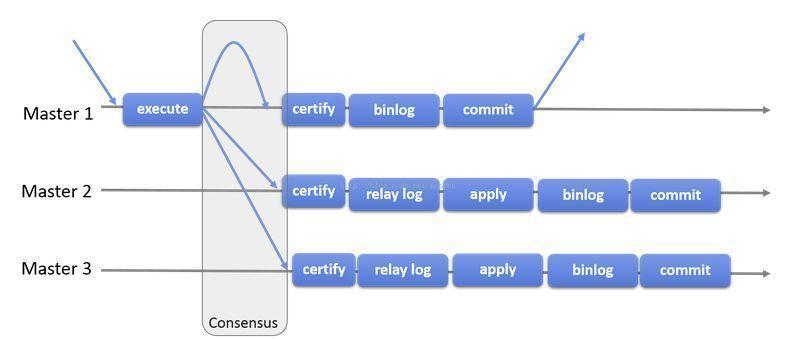
组复制是一种可用于实现容错系统的技术。复制组是一个通过消息传递相互交互的Server集群。复制组由多个Server成员组成,如下图的Master1、Master2、Master3,所有成员独立完成各自的事务。
当客户端发起一个更新事务时,该事务先在本地执行,执行完成之后就要发起对事务的提交操作。在还没有真正提交之前,需要将产生的复制写集广播出去,复制到其它成员。如果冲突检测成功,组内决定该事务可以提交,其它成员可以应用,否则就回滚。
最终,所有组内成员以相同的顺序接收同一组事务。因此组内成员以相同的顺序应用相同的修改,保证组内数据强一致性。
三、MGR特点
高一致性。基于原生复制及paxos协议的组复制技术,并以插件的方式提供,提供一致数据安全保证;
高容错性。只要不是大多数节点坏掉就可以继续工作,有自动检测机制,当不同节点产生资源争用冲突时,不会出现错误,按照先到者优先原则进行处理,并且内置了自动化脑裂防护机制;
高扩展性。节点的新增和移除都是自动的,新节点加入后,会自动从其他节点上同步状态,直到新节点和其他节点保持一致,如果某节点被移除了,其他节点自动更新组信息,自动维护新的组信息;
高灵活性。有单主模式和多主模式,单主模式下,会自动选主,所有更新操作都在主上进行;多主模式下,所有server都可以同时处理更新操作。
四、使用限制
(1) 仅支持innodb引擎
为什么需要使用innodb引擎呢?在MySQL Group Replication中,事务以乐观形式执行,但是在提交时检查冲突,如果存在冲突,则会在某些实例上回滚事务,保持各个实例的数据一致性,那么,这就需要使用到事务存储引擎,同事Innodb提供一些额外的功能,可以更好的管理和处理冲突,所以建议 业务使用表格使用inndb存储引擎,类似于系统表格mysql.user使用MyISAM引擎的表格,因为极少修改及添加,极少出现冲突情况。
(2)主键
每个需要复制的表格都必须定义一个显式主键,注意跟隐式主键区分(使用Innodb引擎的表格,如果没有指定主键,默认选择第一个非空的唯一索引作为主键,如果没有,则自动创建一个6个字节的rowid隐式主键)。这个主键能在冲突发生时启动极其重要的作用,同时,能够有效提高relay log的执行效率。
(3)隔离级别
官网建议使用READ COMMITTED级别,除非应用程序依赖于REPLEATABLE
READ,RC模式下没有GAP LOCK,比较好支持Innodb本身的冲突检测机制何组复制的内部分布式检测机制一起协同工作。不支持SERIALIZABLE隔离级别。
(4)外键
不建议使用级联外键,如果旧库本身有外键,业务上无法去除并且使用的是多主模式,那么,请配置group_replication_enforce_update_everywhere_check ,强制检查每个组成员的级联检查,避免多主模式下执行级联操作造成的检测不到的冲突。
五、参数规范
因前期创建实例大多采取默认配置 导致开发,测试,生产等环境间数据库参数不同 对程序运行有一定的影响。 以后创建实例将会参数规范化 对已有的实例后续也会慢慢修正。
下面简单解释下几个改动的参数
sql_mode 去除了ONLY_FULL_GROUP_BY, STRICT_TRANS_TABLES,NO_ZERO_IN_DATE, NO_ZERO_DATE等限制 采取了较为宽松的模式
lower_case_table_names 统一设置为1 即不区分大小写 有些实例还没更改 大家建表建库的时候不要大写
character-set-server 统一设置为utf8 不要用latin1字符集
wait_timeout和interactive_timeout参数控制空闲连接的时长 当连接空闲时间超过此参数则会被断开 以后会统一设置为1800s即30分钟
transaction_isolation 事务隔离级别 MySQL官方默认是可重复读(repeatable-read)目前单实例及主从架构的mysql采用了此级别,MGR集群将采取读已提交(read-committed)级别。Oracle默认是读已提交 。
六、两地三中心应用
随着互联网业务快速发展,多IDC的业务支撑能力和要求也逐步提升,行业内的“两地三中心”方案较为流行。其中两地是指同城、异地;三中心是指生产中心、同城容灾中心、异地容灾中心。
两地三中心方案中,基于设定的短期目标可以明确同城双活和异地容灾的方案组合。设计重点为同城双活,即在同城的数据中心之间,一般通过高速光纤相连,在网络带宽有保障的前提下,网络延迟一般在可接受范围内,两个机房之间可以认为在同一个局域网内。
在设计上可以和应用层结合起来,有两种部署模式:分为应用层双活和数据库双活,应用层双活和数据库单活。
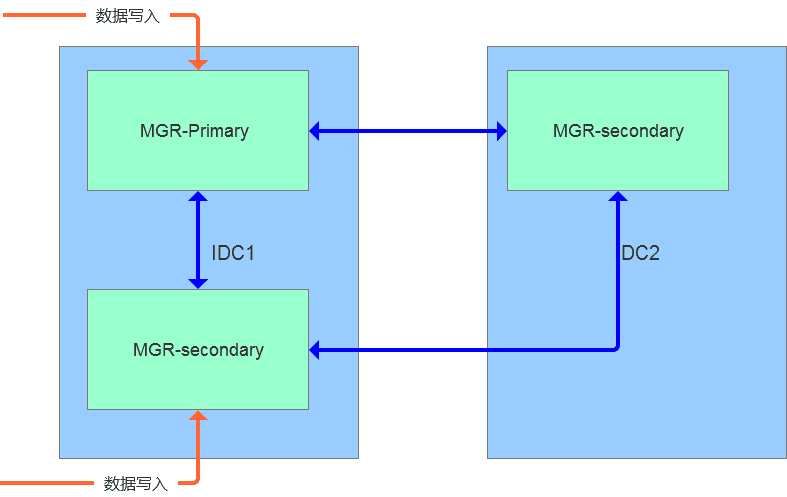
(1)MGR集群多活架构
基于MGR的多活特性,数据的写入可以在多个节点之间进行复制,实现数据强一致性需求,并且在节点间通信出现延迟的情况下,会自动实现服务降级。对于此类方案,我们可以采用同机房多写,同城异机房只读的方案。
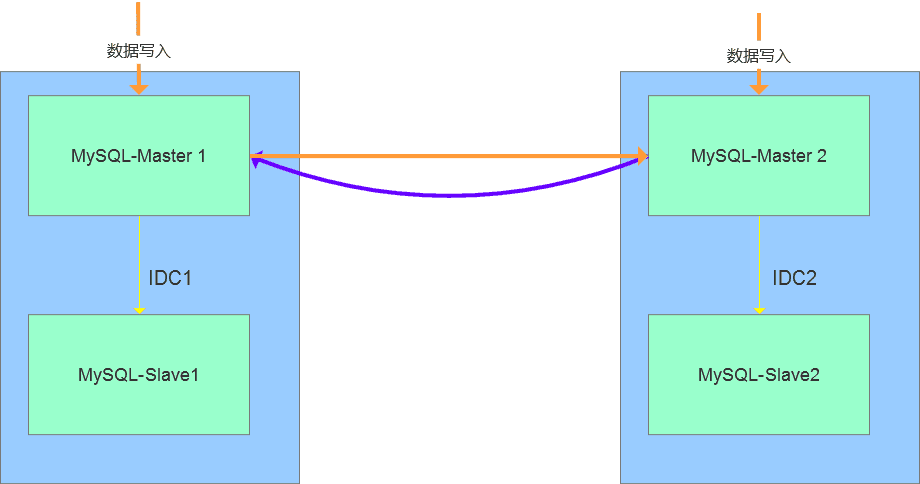
(2)双主模式的多活
两个节点均可以写入数据,可以实现跨机房的数据复制,延迟较低,在业务层需要做隔离,在故障发生时能够快速切换到同机房的Slave节点。此方案对于两个IDC机房的场景中较为实用,但是机房多活的场景不适合。
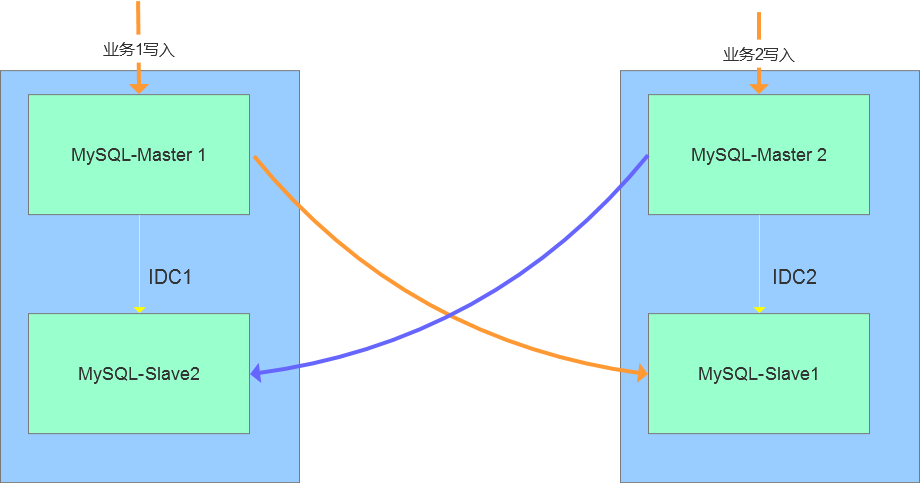
(3)业务交叉的双活方案
此种方案是双活技术的变通实现,即存在两类业务A和B,数据存储在database级别(schema层级),分别在不通的IDC节点完成数据写入,比如业务A在IDC1完成写入,业务B在IDC2完成写入,两个节点之间存在跨机房的复制节点,在出现问题时,能够通过域名的方式切换到指定的IDC节点。此种方案对于业务的依赖性较高,不适合机房多活的场景。
作者:架构设计思维
最先想到的办法是用命令把jar包解压jar -xvf xxx.jar 修改完毕后重新打包 jar cf xxx.jar * ,本以为是大功告成,执行java -jar xxx.jar 报错
no main manifest attribute,in xxx.jar
经了解需要在MANIFEST.MF文件添加main方法的类。用maven打包的话这些都自动配置了。 对比两次生成MANIFEST.MF文件里边确实少了不少内容项,根据报错内容主要的main方法的类没有指定
Main-Class: org.springframework.boot.loader.JarLauncher
Start-Class: xxxApp
用jar重新打包的方法肯定是不行了,肯定还有需要注意的细节。又一想我只是要修改配置文件,替换掉jar包里的配置文件就可以了。查了下jar的文档。果然有更新方法:
jar uf xxx.jar BOOT-INF/classes/application-dev.yml
替换之,启动jar,顺顺利利的启动了。
后来对于最先想到的方法又在网上查了下,也有对应的解决办法,但是会有两个问题要处理
-M 不配置配置清单,这样还可以使用maven生成的配置清单也就是MANIFEST.MFjar -cfM xxx.jar *
-0jar -cfM0 xxx *
压缩的话会有错误,如下:(已被压缩,嵌套的jar文件无需被压缩)
Unable to open nested entry 'BOOT-INF/lib/cache-api-0.4.jar'.
It has been compressed and nested jar files must be stored without compression.
最终命令:jar -cfM0 xxx.jar *
npm淘宝源
npm config set registry=https://registry.npm.taobao.org
npm config set sass_binary_site=https://npm.taobao.org/mirrors/node-sass/
npm config set phantomjs_cdnurl=https://npm.taobao.org/mirrors/phantomjs/
npm config set electron_mirror=https://npm.taobao.org/mirrors/electron/
yarn淘宝源
yarn config set sass_binary_site https://npm.taobao.org/mirrors/node-sass/
yarn config set phantomjs_cdnurl https://npm.taobao.org/mirrors/phantomjs/
yarn config set electron_mirror https://npm.taobao.org/mirrors/electron/
link: https://www.cnblogs.com/mldonkey/p/13387119.html
yum -y install wget
wget -O /etc/yum.repos.d/epel.repo http://mirrors.aliyun.com/repo/epel-7.repo
yum makecache
yum -y install nmon
nmon
link:https://blog.csdn.net/weixin_42612178/article/details/115801519
警告:setlocale: LC_CTYPE: 无法改变区域选项 (UTF-8)
在/etc/environment添加:
LC_ALL=zh_CN.UTF-8
LANG=zh_CN.UTF-8
使用命令显示隐藏文件
sudo chflags nohidden opt
隐藏文件命令
sudo chflags hidden opt
内核参数overcommit_memory
它是 内存分配策略
可选值:0、1、2。
0, 表示内核将检查是否有足够的可用内存供应用进程使用;如果有足够的可用内存,内存申请允许;否则,内存申请失败,并把错误返回给应用进程。
1, 表示内核允许分配所有的物理内存,而不管当前的内存状态如何。
2, 表示内核允许分配超过所有物理内存和交换空间总和的内存
什么是Overcommit和OOM
Linux对大部分申请内存的请求都回复”yes”,以便能跑更多更大的程序。因为申请内存后,并不会马上使用内存。这种技术叫做 Overcommit。当linux发现内存不足时,会发生OOM killer(OOM=out-of-memory)。它会选择杀死一些进程(用户态进程,不是内核线程),以便释放内存。
当oom-killer发生时,linux会选择杀死哪些进程?选择进程的函数是oom_badness函数(在mm/oom_kill.c中),该 函数会计算每个进程的点数(0~1000)。点数越高,这个进程越有可能被杀死。每个进程的点数跟oom_score_adj有关,而且 oom_score_adj可以被设置(-1000最低,1000最高)。
解决方法:
很简单,按提示的操作(将vm.overcommit_memory 设为1)即可:
有三种方式修改内核参数,但要有root权限:
(1)编辑/etc/sysctl.conf ,改vm.overcommit_memory=1,然后sysctl -p使配置文件生效
(2)sysctl vm.overcommit_memory=1
(3)echo 1 > /proc/sys/vm/overcommit_memory
使用docker时,
每次停止docker systemctl stop docker 命令执行完都会提示
Warning: Stopping docker.service, but it can still be activated by: docker.socket
目前找到的问题原因是:
This is because in addition to the docker.service unit file, there is a docker.socket unit file… this is for socket activation. The warning means if you try to connect to the docker socket while the docker service is not running, then systemd will automatically start docker for you. You can get rid of this by removing /lib/systemd/system/docker.socket… you may also need to remove -H fd:// from the docker.service unit file.
这是因为除了docker.service单元文件,还有一个docker.socket单元文件…docker.socket这是用于套接字激活。
该警告意味着:如果你试图连接到docker socket,而docker服务没有运行,系统将自动启动docker。
你可以删除 /lib/systemd/system/docker.socket
从docker中 docker.service 文件 删除 fd://,即remove -H fd://
如果不想被访问时自动启动服务
输入命令:
sudo systemctl stop docker.socket
Link: https://blog.csdn.net/weixin_43885975/article/details/117809901
systemctl status firewalld
firewall-cmd --state
查看linux哪些程序正在使用互联网
firewall-cmd --permanent --list-services ssh dhcpv6-client
开启
service firewalld start
重启
service firewalld restart
关闭
service firewalld stop
firewall-cmd --list-all
查询端口是否开放
firewall-cmd --query-port=8080/tcp
开放80端口
firewall-cmd --permanent --add-port=80/tcp
firewall-cmd --permanent --add-port=8080-8085/tcp
移除端口
firewall-cmd --permanent --remove-port=8080/tcp
查看防火墙的开放的端口
firewall-cmd --permanent --list-ports
重启防火墙(修改配置后要重启防火墙)
firewall-cmd --reload
参数解释
1、firwall-cmd:是Linux提供的操作firewall的一个工具;
2、--permanent:表示设置为持久;
3、--add-port:标识添加的端口;
Link: https://blog.csdn.net/qq_41153478/article/details/83033688